Why I recommend one
Recently a pupil of mine was driving along a main road when a car came out of a T-junction without stopping and drove into the side of her car. The other driver admitted it was his fault and agreed to pay for the damage.
She was fortunate. If he had claimed she was going too fast, or that he had already pulled out, it would have been her word against his. A forward-facing dash cam may well have recorded his car approaching the junction without slowing down. That is the kind of evidence that settles a question like that.
For a learner or newly qualified driver, a clear recording can be particularly useful when the accounts of those involved differ.
If you practise in your own or a family car, it is worth fitting one before you start, not after your first incident.
What a dash cam does
- Records continuously while you drive, then records over the oldest footage when the memory card is full (loop recording).
- Most models lock a clip automatically when they detect an impact or harsh braking, so it is not recorded over.
- Many record GPS speed and location alongside the video, which shows where you were and how fast you were going.
- Some offer a parking mode that records while the car is parked, useful for car park knocks (often needs a hardwire cable).
Choosing a dash cam
There are four decisions, in this order.
1. Forward-facing only, or front and rear?
Forward-facing only. One camera behind the rear-view mirror recording the road ahead. The cheapest and simplest to fit. It covers what is in front of you: junctions, roundabouts, vehicles pulling out. Wider lenses see more of the road either side.
Front and rear. A second camera on the rear window records what is behind you. It covers rear-end collisions, for example someone driving into the back of you in queuing traffic or at a junction, and helps in car parks. There is more to fit, because the rear camera is usually wired to the front unit. Some brands, such as Garmin, do not sell front-and-rear kits. Instead you can link up to four Garmin dash cams together in the Garmin Drive app, for example one on the windscreen and a second on the rear window, and combine their recordings into a single picture-in-picture video.
2. What resolution?
Most dash cams record in 1080p (Full HD), 2K (1440p) or 4K (Ultra HD). Higher resolution gives a sharper picture, which makes things like number plates easier to read, especially at a distance or in poor light. It also takes up more space on the memory card and usually costs more. For most drivers, the choice comes down to whether 1080p is good enough or whether you want the extra detail of 2K or 4K.
3. Do you want a screen?
Some dash cams have a small screen so you can watch footage back on the camera itself. Many, including BlackVue models, do not, and you view footage in the app instead.
Honestly, I have a dash cam with a screen and I never use it. I connect the camera to my phone by Wi-Fi or Bluetooth, watch the footage in the app and save the clips straight to my phone. A screen is useful if you do not have your phone with you, but for most people it is a nice extra rather than a deciding factor.
4. What size memory card?
Because a dash cam records over its oldest footage once the card is full, the size of the card decides how far back your footage goes.
Clips locked by the camera after an impact are protected. But if you see something you want to keep and the camera did not lock it, say a car that cut you up or a near miss with no collision, that footage will eventually be recorded over.
- If you drive a lot and only check your footage now and then, buy a larger card so you have time to get to it.
- If you save clips to your phone straight away, a smaller card is fine.
- If you want to keep a clip the camera did not lock, save it as soon as it is safe to do so.
Interior-facing cameras
Some cameras, such as the Garmin Dash Cam Tandem, record the road ahead and the inside of the car rather than the road behind. They are aimed at taxis and professional drivers. Most learners and new drivers do not need one.
An honest point about side impacts
Neither a front nor a rear camera points out of the side windows. In a side impact like my pupil's, a wide-angle front camera may well capture the other vehicle approaching the junction, and that can be strong evidence even if the moment of impact is out of shot. The locked clip, plus time, speed and location data, also helps show what happened. But no dash cam guarantees a perfect view of every collision.
What to do after a collision
The law on what you must do after a collision is the same whether or not you have a dash cam.
Stop, somewhere safe. You must stop if the collision causes damage or injury to another person, vehicle, animal or property. That does not mean stopping exactly where it happened. If the cars can still be driven safely, move somewhere out of the way first, so you are not blocking a junction or live traffic.
Within two months of passing my test, someone drove into the back of my car at a junction. Stopping there would have blocked the road, so we both drove on to the next roundabout, turned off and pulled up somewhere safe.
Make it safe. Switch off the engine if appropriate, use your hazard lights if they will help warn other road users, and check whether anyone is hurt. If someone is injured, call 999.
Exchange details. Give your name and address, the vehicle owner's name and address if the car is not yours, and your registration number to anyone with reasonable grounds to ask, such as the other driver. Take the same from them, and note their registration yourself. Photos of the vehicles, the damage and the scene, plus names and numbers of any witnesses, all help.
Know when to report it to the police. You must report the collision to the police as soon as you reasonably can, and within 24 hours at the latest, if you did not exchange details at the scene. The Metropolitan Police also advise reporting it if anyone was injured. In my own collision I rang the police anyway. The officer told me that as we had exchanged details and nobody was hurt, we had done what the law requires.
Tell your insurer. Most policies require you to tell them about any collision, even if you are not making a claim. Check your policy.
Save your footage. If the camera did not lock the clip automatically, save it or remove the memory card once you are safe, so it is not recorded over. Tell your insurer you have footage.
Do not post it online. Do not edit the footage or put it on social media. Police advice is that footage in the public domain can harm later proceedings.
For driving offences you witness where there is no collision, many police forces accept dash cam footage through Operation Snap or the National Dash Cam Safety Portal. Check your local force's rules and deadlines.
Fitting it legally
The GOV.UK rule on devices applies here too: nothing mounted in the car should block your view of the road and traffic ahead. Behind the rear-view mirror is the usual spot for the front camera. Never adjust a dash cam or pick it up while driving.
The latest dash cams
ActiveGPS is run by the author of this guide.
Forward-facing: Garmin
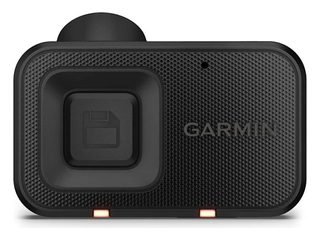 Garmin Dash Cam Mini 3: small and screenless, 1080p.
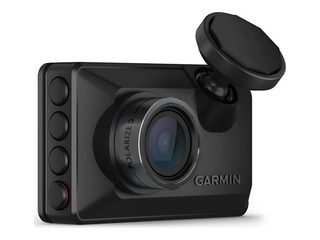 Garmin Dash Cam X210: 2K (1440p), 2.4-inch screen, 140-degree lens, built-in GPS. The same design also comes as the X110 (1080p) and X310 (4K).
- Garmin dash cams can be paired, so a second camera on the rear window gives you front and rear coverage.
Front and rear: Mio
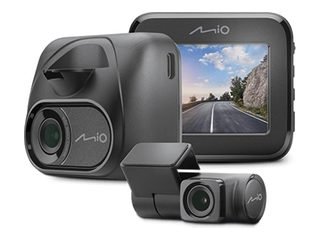 Mio MiVue C595WD: front and rear, 1080p front and rear cameras with a 140-degree front view, Wi-Fi.
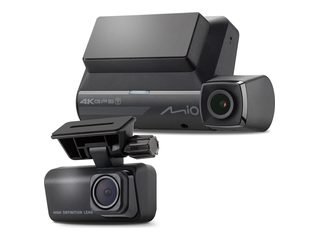 Mio MiVue 956WD: front and rear, 4K front and 1080p rear, Wi-Fi.
Front and rear: BlackVue
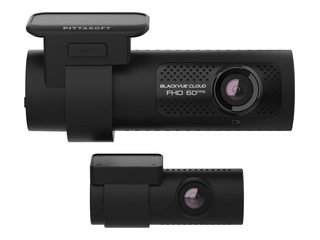 BlackVue DR770X 2CH: a popular front-and-rear choice, 1080p.
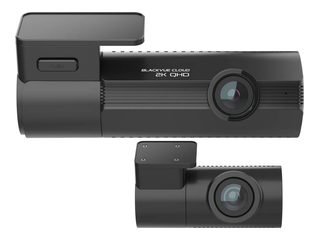 BlackVue ELITE 8 2CH: from BlackVue's newer ELITE series, 2K front and rear. The ELITE 10 steps up to 4K.
Buyer's guide: how to choose the best dash cam.
Back to the hub
This guide is part of our In-Car Technology for Learner and New Drivers section.
Please note: This is general driving guidance, not a substitute for in-car instruction. Always follow the actual lanes, road markings, signs, and signals in front of you, they take priority over anything written on this page.
Keep Building Your Driving Knowledge
Explore our free guides to build your knowledge before your first lesson.
View All Driving Guides